Jobber alternative
Service VIN vs Jobber
Bring your customers and history across by CSV, keep Jobber running while you evaluate, and quote by the VIN with margin showing live.
No credit card required, free for 14 days, imports from any CSV
Switching is a copy-paste, not a teardown
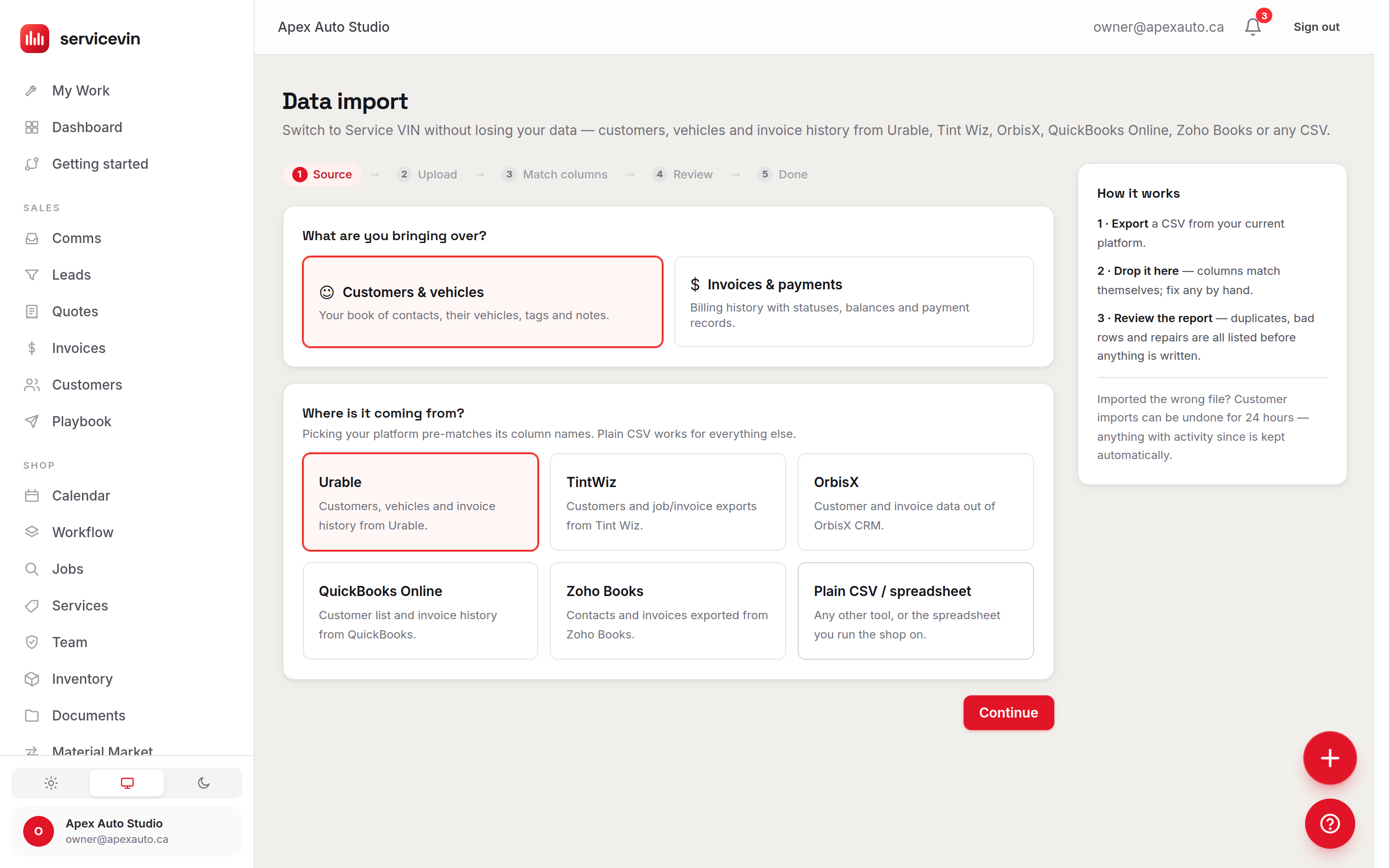
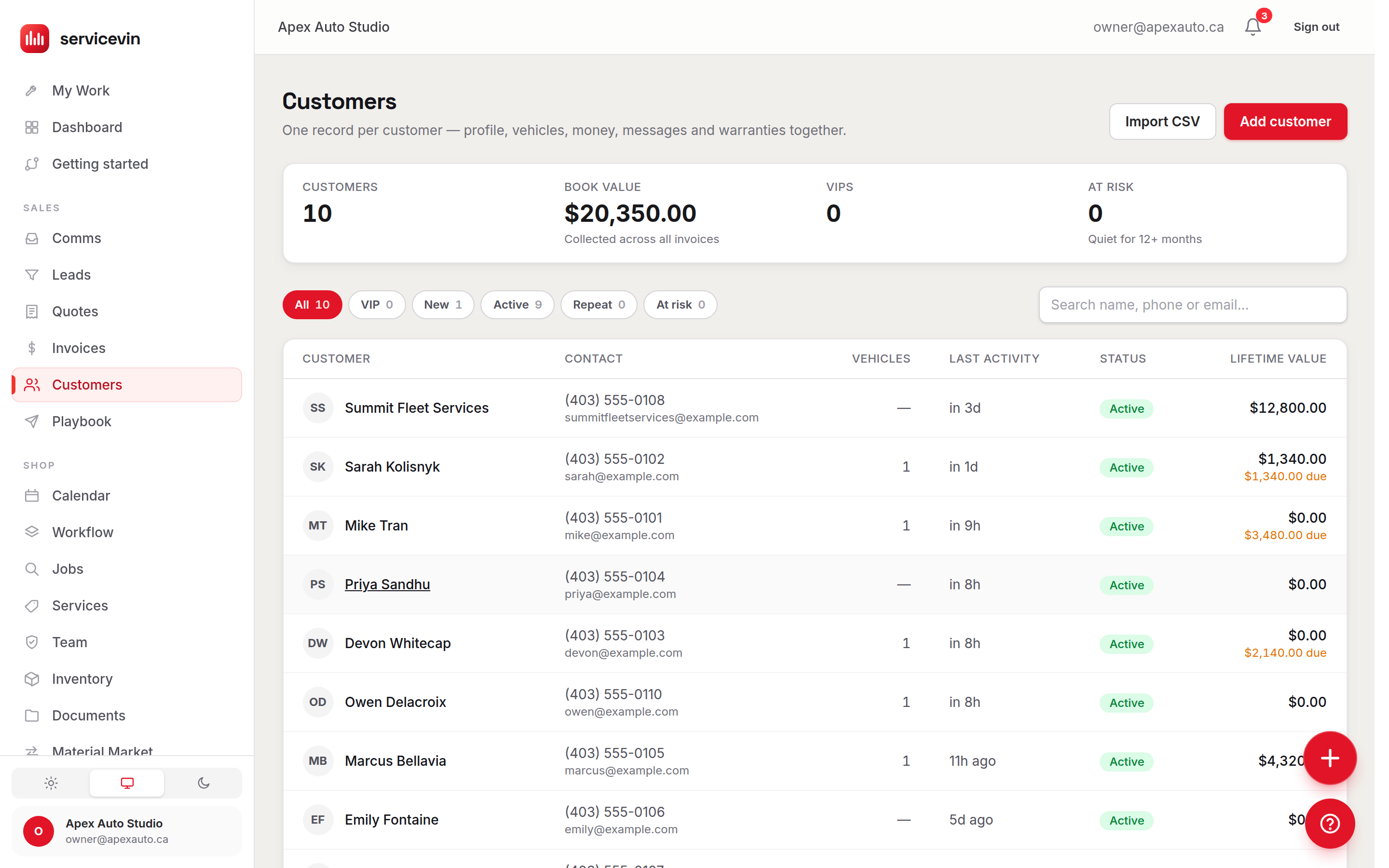
Coming from Jobber? Bring your book with you. Jobber is not a native one-click import preset — those are Urable, Tint Wiz, OrbisX, QuickBooks Online and Zoho Books — but Service VIN imports from any CSV, so export your Jobber list and bring it across. To be straight with you, the importer moves customers, vehicles, invoice history, job history and open leads; it does not move photos, quotes, notes or appointment history. Importing never messages your customers — an enforced, self-tested guarantee — and a one-click undo removes what an import added if you have not started working the records.
A CSV from the old tool, its columns matching themselves, a dry-run report listing every skipped row by number while the shop owner reads it, and the customers, vehicles and invoices counting in.

Keep Jobber running while you evaluate. There is no switch-over day until you pick one. Prefer a hand? The concierge migration maps your file for you, with a 48-hour go-live target from the moment it lands with us. See exactly how the importer works on the data import page — then test the whole thing free for 14 days before you switch.
- Importing never texts, emails or calls your customers
- Keep your current tool running while you evaluate
- Free for 14 days · no credit card required
- Built by the owner of a working PPF and detailing shop in Canada
The short answer
Is Service VIN a good Jobber alternative for a detailing, PPF or tint shop?
Jobber is the better product for home services, with dispatch, routing and an ecosystem Service VIN does not match. Service VIN is the better fit for a shop whose work is on vehicles: quotes start with a VIN, film is costed to the linear foot, and seats are never billed per head.
- Jobber is an excellent home- and field-service platform — quoting, scheduling, dispatch, invoicing, automations, online booking and a client hub — and shops in those trades run happily on it (Jobber's published materials, July 2026).
- It models the property and the job at an address, not the vehicle: no VIN capture, no per-vehicle garage, no film inventory by the foot, and third-party detailing roundups note manual workarounds for film-tier pricing (July 2026).
- Service VIN is vehicle-native — VIN-scan garage and history, panel-level and film-tier quoting, and a live profit margin costed from the real per-foot cost of the roll you will cut.
- AI is packaged differently: Jobber's AI Receptionist is a metered add-on (about $29/mo for 30 conversations, roughly $0.79 each after, unlimited only on the top plan), while Service VIN bundles a calling copilot and texting agents into the platform (July 2026).
- Price shapes differ: Jobber's published plans run from around $39/mo for one user to roughly $599/mo, plus about $29 per extra user, while Service VIN is flat per shop — Essentials $79, Growth $199, Operations $299 and Command $399 in US dollars, no per-seat charge.
Bottom line: Pick Jobber if you run home services and want a mature, well-liked platform for that work. Pick Service VIN if you work on vehicles and want VIN records, film-tier quoting, margin from real film cost and AI that isn't metered.
Flat plans. Every number in public.
Four plans, one flat price per shop, and the seats are not metered from Growth up. Move up when the shop does.
Essentials
$79/mo
The whole shop, organized — quotes to invoices to inventory.
100 AI credits/mo, 3 team logins
Growth
$199/mo
AI agents work your pipeline around the clock.
500 AI credits/mo, unlimited team logins
The whole operation, phone line included
Operations
$299/mo
The whole operation, with your business number and the front desk that answers the calls you miss.
750 AI credits/mo, unlimited team logins
Command
$399/mo
Every call answered, every location covered.
1,500 AI credits/mo, unlimited team logins
- No per-seat tax — add your whole crew for free
- A typical month costs $0 extra
- Two months free on annual billing
- Prices in US dollars
Free for 14 days · no credit card required. Your 14 days run with every feature unlocked, and when the 14 days are up nothing happens automatically — pick a plan when you're ready, or don't.
The job: quote a vehicle, not a job at an address
Price by the VIN, panel and film tier
A home-service quote is a job pinned to a property. A PPF or tint quote is a vehicle: this VIN, these panels, this film tier. Service VIN starts there — and shows what every line does to your profit, costed from the real film on your shelf, not a rate you set months ago.
- Quotes start with the VIN, not an address
- Scan a VIN and the year, make and model are on the quote before you type — so pricing is tied to the actual vehicle in the bay, not a job pinned to a property the way a home-service tool models it.
- Panel-level and film-tier pricing
- Price a full front, a track pack or a full body by panel, and switch film tiers per coverage — the kind of quoting a home-service CRM needs manual workarounds to fake, and that detailing roundups already flag Jobber for.
- Live profit margin on every quote
- Margin in dollars and percent updates on every line as you build the quote — so an underpriced full-front PPF or ceramic package gets caught before you send it, not when you reconcile at month end.
- Costed from the real film you use
- Margin uses the actual cost of the film, coating and consumables the job will consume, tracked in inventory to the foot — not a flat rate or a parts markup. A job quote tells you the price; Service VIN tells you the profit.
One quote through Service VIN: three lines priced off a real film roll at $31.50 a foot, a 58% live margin landing while the shop owner watches, the estimate sent by email with the text pointing at it, Priya Sandhu approving and paying an $827.82 deposit by card, and the invoice raising itself with the same lines and a $1,931.58 balance.

The job: answer every lead without a meter running
A front desk that never clocks out
Jobber's AI Receptionist is a metered add-on. Service VIN bundles a whole AI team into the platform — listening, drafting and following through, all inside the same CRM and lead inbox — so a busy month doesn't come with a per-conversation tax, and a typical month costs $0 extra.
- AI calling copilot
- Records, transcribes and summarizes every call, then drafts the promised quote, text or booking for you to send with one tap — nothing slips because the crew was heads-down on a hood.
- A crew of AI agents
- Lead responder, quote follow-up, win-back and review requester work your pipeline around the clock. Every agent is draft-first, with opt-outs and quiet hours enforced in code, not left to a checkbox.
- Unified text and call inbox
- Every call and text with a customer lives in one thread tied to their vehicle and history — no jumping between a cell phone, a texting app and a separate scheduling tool to piece a conversation together.
- AI scheduling by profit
- Open bay slots are ranked by projected profit, so the calendar fills with the film and coating work worth doing instead of whatever inquiry happened to land first.
As of July 2026 (verify current pricing on Jobber's site), Jobber's AI Receptionist is an add-on — roughly $29/mo for 30 conversations, about $0.79 each after, with unlimited answering only on its top Plus plan. Service VIN's AI scheduling and calling copilot come with the platform, ranking every open bay slot by projected profit before it offers a time.
Her phone: a call to the shop that rings out, the text back seconds later, her reply, and the booking confirmation, with a clip of her reading it in her parked car.

The job: run a film-and-coating floor, not a home-service crew
Bays, film and warranties under control
The appearance-shop work a home-service platform was not shaped for. Protect every bay from a double-booking, and track a four-figure roll like the asset it is with inventory to the foot.
- Bay scheduling that cannot double-book
- A drag-and-drop calendar with bay protection enforced in the database, so two installs never land on the same bay by accident — a long PPF wrap and a same-day coating never collide.
- Film and material inventory to the foot
- Rolls, remnants, lot numbers and reorder alerts before a core film runs dry — four-figure rolls treated like the asset they are, feeding real cost into every quote and job. A home-service tool never had a reason to measure a roll this way.
- Vehicle garage with VIN scan
- Scan a VIN to build a customer garage with every vehicle, coverage and past service on file — ready the next time they call about a top-up coat, a second panel or another car.
- Warranty and document portal
- Film and coating warranties and contracts go out as secure, expiring links, and every signed document is filed against the customer and the vehicle automatically — no PDFs lost in a text thread.
One roll through Service VIN: the rack showing what is left on four rolls of film at what the shop paid for them; job #1042, a full front on a 2024 Model Y, taking 18.0 ft off roll R-1041 at CA$333.00 of material; that roll dropping from 32 ft to 14 and past its 25 ft reorder point; and STEK DYNOshield landing on the reorder list, with the shop owner checking the job on a tablet in the bay.

Run it beside Jobber for a week
Start free, bring your book across by CSV, and run one week's jobs on both. Jobber keeps running, and nothing goes out to a customer until you send it.
No credit card required, free for 14 days, cancel anytime
The honest head-to-head
Every Jobber claim below carries a numbered source note and the date we checked it. Jobber is genuinely capable at what it was built for; this table is about fit and about where the bill goes.
| What you are comparing | Service VIN | Jobber |
|---|---|---|
| Scheduling, dispatch and invoicing | Yes: Bay and installer scheduling with database-enforced double-book protection | Yes: A mature scheduling, dispatch, invoicing and client-hub platform1 |
| Vehicle-native records (VIN, garage, history) | Yes: VIN-scan garage with every vehicle, warranty and past install on file | No: Models the property and the job at an address — no VIN or vehicle garage2 |
| Panel-level and film-tier quoting | Yes: Quote by panel or coverage package, with film tiers priced natively | No: Roundups report manual workarounds for film-tier pricing3 |
| Film inventory to the foot, with real COGS | Yes: Rolls, remnants and lot numbers feeding true cost into every job | No: Not part of a home-services model2 |
| AI on the calls and texts | Yes: Calling copilot plus draft-first texting agents, bundled into the platform | Partly: AI Receptionist is a metered add-on; unlimited only on the top plan4 |
| Where the features sit | Yes: Automations, online booking and two-way texting on every plan | Partly: Automations, online booking and QuickBooks sync step up a tier; two-way texting a tier above5 |
| What you pay | Flat tiers — Essentials $79, Growth $199, Operations $299, Command $399 in US dollars, two months free on annual, no per-seat charge | Tiered plans from about $39/mo to roughly $599/mo, plus about $29 per extra user6 |
| Moving your data across | Partly: Any CSV export — customers, vehicles, invoice history, job history and open leads (Jobber is not a native preset) | — |
Sources & notes
Facts checked
- 1.Jobber's own published positioning, July 2026: quoting, scheduling, dispatch, invoicing, automations, online booking and a client hub for the home-services market. getjobber.com
- 2.Observation from Jobber's published product materials, July 2026: Jobber models the property and the job at an address; VIN capture, a per-vehicle garage and film inventory by the linear foot are not part of it. That is a fit statement, not a knock — it was built for home services. getjobber.com
- 3.Per third-party detailing and tint software roundups, July 2026: shops report manual workarounds for tint-specific needs such as film-tier pricing in Jobber.
- 4.Per Jobber's published pricing, July 2026 — verify current pricing on jobber.com: the AI Receptionist is an add-on at roughly $29/mo for 30 conversations and about $0.79 per conversation after that, with unlimited answering on the top Plus plan. getjobber.com/pricing
- 5.Per Jobber's published plan comparison, July 2026: automations, online booking and QuickBooks sync unlock a tier up from the entry plan, and two-way texting a tier above that. getjobber.com/pricing
- 6.Per Jobber's published pricing and third-party breakdowns, July 2026: plans run from around $39/mo for a single user up to roughly $599/mo at the top, with about $29 per extra user. getjobber.com/pricing
Jobber figures above are approximate and as of July 2026, drawn from Jobber's published pricing and third-party breakdowns. Pricing and packaging move — verify the current details on jobber.com before you decide.
Which one fits your shop?
Use this comparison to decide with your eyes open. Both platforms serve their market well — they are simply built for different kinds of work: Jobber for the home, Service VIN for the vehicle.Jobber figures on this page are drawn from published pricing and third-party breakdowns as of July 2026 and are framed conservatively — plans, tiers and add-on rates change, so verify current pricing on Jobber's own site before you decide.
- You run a home- or field-service business — lawn care, cleaning, HVAC, general service — where the job lives at a property, not on a vehicle.
- Your core need is quoting, scheduling, invoicing and a client hub for the broad home-services market, and you value a large, mature ecosystem.
- A VIN garage, panel-level and film-tier quoting, film-roll inventory and a bundled AI team are not on your must-have list.
- You install PPF, wrap, tint or ceramic and want software built for vehicles — VIN capture, a per-vehicle garage and history — not a home-service tool you bend to fit.
- You want to price by panel and film tier with a live profit margin, costed from your real film cost, and film inventory tracked to the foot.
- You run a fixed-location shop with bays and want scheduling that cannot double-book.
- You want an AI team bundled in — no per-conversation tax — plus flat pricing with no per-seat charge and unlimited team logins on Growth and up.
Four differences that show up in the bank
Built for the vehicle, not the property
The core difference. Jobber models the home, the property and the job at an address; Service VIN models the vehicle — VIN capture, a per-vehicle garage and history, and panel-level, film-tier quoting are native, not a workaround bolted onto a home-service workflow.
An AI team bundled, not metered
Jobber's AI Receptionist is a metered add-on. Service VIN bundles a whole AI team into the platform — a calling copilot plus lead, quote-chase, win-back and review agents — so a typical month costs $0 extra, with no per-conversation tax as you get busy.
A film-and-coating shop floor
Bay scheduling that cannot double-book, film inventory to the foot with real COGS on each job, and a VIN-scan garage with warranties — the appearance-shop floor a home-service platform was never shaped to run.
Flat price, no tier-gated squeeze
Simple monthly plans in US dollars: Essentials $79, Growth $199, Operations $299 and Command $399, two months free on annual billing, and no per-seat charge — Growth and Command carry unlimited team logins, and Essentials includes three.
Illustrative estimate — actual time saved depends on your shop and how many separate apps a call, text and booking currently pass through.
| Item | Value ( hrs) |
|---|---|
| Several tools | 10 hrs |
| One system | 3 hrs |
If the second list is your shop
Start free and put one real quote through it before you decide anything. Nothing is charged, and Jobber stays exactly as it is.
No credit card required, free for 14 days, cancel anytime
First, credit where it is due
Jobber earned its reputation honestly.
Gabriel, who runs a working PPF and detailing shop in Canada
Prefer the full grid? See the complete side-by-side comparison
Where to start
It starts with the call you missed.
A bundled receptionist answers the phone. This one answers from your real services and your real prices, drafts the quote you promised, and writes the booking into your calendar.
It answers from your real services, your real prices and your real calendar — and writes the booking into them. No migration, no data to move — it runs beside whatever you use today.
A customer reading a text in her parked car, a shop owner at her laptop and at the shop's glass door, and the call, text-thread, quote, calendar and review panels drawn over the pictures.

Service VIN vs Jobber, answered
Is Service VIN a good Jobber alternative for a detailing or PPF shop?
It is, if your work is vehicles rather than homes. Jobber is an excellent, widely-used home- and field-service platform — quoting, scheduling, invoicing, automations, online booking and a client hub that a huge number of businesses run their week on. The gap for an appearance shop is that Jobber models the property, the home and the job at an address; it has no VIN capture, no per-vehicle garage, no film or roll inventory and no panel-level or film-tier quoting. Service VIN is built the other way around: quotes start with the VIN, you price a full front or a track pack by panel and film tier, film inventory is tracked to the foot, and a bundled AI team answers calls and works your texts. If you run lawn care, cleaning or general home service, Jobber may fit better; if you install PPF, wrap, tint or ceramic, Service VIN is built for exactly that.
How does Jobber's pricing compare to Service VIN's?
Service VIN is flat: Essentials $79, Growth $199, Operations $299 and Command $399 in US dollars, two months free on annual billing, no per-seat charge, and unlimited team logins on Growth and up (Essentials includes three). Jobber uses tiered plans with a per-user fee. As of July 2026 — verify current pricing on Jobber's own site — Jobber's published plans run from around $39/mo for a single user up to roughly $599/mo at the top, with roughly $29 per extra user on top. The catch most shops feel is where features sit: automations, online booking and QuickBooks sync unlock a tier up from the entry plan, and two-way texting a tier above that, so the features you actually want tend to push the real price toward the middle of that range rather than the headline $39.
Is Service VIN's AI an add-on like Jobber's AI Receptionist?
No — it is bundled into the platform, not sold as a metered add-on. As of July 2026 (verify current pricing), Jobber's AI Receptionist is priced as an add-on, roughly $29/mo for 30 conversations and about $0.79 for each conversation after that, with unlimited answering reserved for the top Plus plan. Service VIN takes the opposite approach: a calling copilot plus texting agents for lead response, quote follow-up, win-back and reviews come with the platform, so a typical month costs $0 extra and there is no per-conversation tax as your call and text volume climbs.
Can I move my data from Jobber to Service VIN?
Yes, through CSV. Jobber is not one of the native one-click import presets — those are Urable, Tint Wiz, OrbisX, QuickBooks Online and Zoho Books — but Service VIN imports from any CSV, so you can export your Jobber list and bring it across. Be honest about scope: the importer moves your customers, their vehicles, your invoice history, your job history and your open leads. It does not move photos, quotes, notes or appointment history. Importing never messages your customers — that is an enforced, self-tested guarantee — and there is a one-click undo that removes the records an import added, as long as you have not started working them. Bring your list over, set your services once, and take your first online booking the same day. Use the 14-day free trial to test the whole thing before you commit; nothing is charged for 14 days.
Isn't a home-service platform like Jobber good enough for a car shop?
For plenty of trades, Jobber is genuinely great — and I'd never knock it for what it does. It's a capable, well-loved platform for home and field service. The gap shows up specifically in vehicle work: a VIN garage so you know exactly which car and coverage you're pricing, panel-level and film-tier quoting, rolls of film measured to the foot, and film or ceramic warranties are the daily reality of an appearance shop, and they aren't the daily reality of a home-service crew. Jobber can be bent to cover some of it with custom fields and workarounds — detailing roundups already point out the manual effort involved for things like film-tier pricing. Service VIN is vehicle-native, so those things are the core of the product rather than something you rig up.
Will I pay per user as my team grows?
No — there is no per-seat charge. Service VIN is flat monthly pricing: Essentials $79, Growth $199, Operations $299 and Command $399 in US dollars, and annual billing gets two months free. Growth and Command give you unlimited team logins for your detailers, installers and front-desk staff; Essentials includes three. Jobber, by contrast, charges roughly $29 per extra user on top of its plan (as of July 2026 — verify current pricing), which is a common cost-creep complaint as a shop adds installers.
Is Service VIN better than Jobber?
It depends on what you work on. Jobber is an excellent home- and field-service platform, and for those trades it is the better tool. Service VIN is better for vehicle work: a VIN-scan garage and history, panel-level and film-tier quoting, film tracked to the foot with real COGS, and an AI calling-and-texting team bundled into the plan rather than metered per conversation. Jobber figures on this page are approximate, as of July 2026, from published pricing and third-party breakdowns — verify on jobber.com.
How do I switch from Jobber to Service VIN?
Export your data from Jobber as CSV and import it into Service VIN. Jobber is not one of the native presets (those are Urable, Tint Wiz, OrbisX, QuickBooks Online and Zoho Books), so it comes across as a CSV import. Customers, vehicles, invoice history, job history and open leads come across; photos, quotes, notes and appointment history do not, so plan to start those fresh. Importing is silent — it never texts, emails or calls a customer — and a customers import can be undone in one click within 24 hours. The full scope and the step-by-step are on the switch page.
Stop bending a home-service CRM to fit a car
Start free, import your book by CSV, and build one quote off a VIN. The first time it prices a full front by panel and flags an underpriced package before you hit send, you'll get it. If it doesn't change how you work, you've lost nothing but an afternoon.
No credit card required, free for 14 days, cancel anytime
Book a demo if you would rather be walked through it first.