All-in-one auto shop software: quote, book, invoice, get paid.
Win the job. Run the shop. One record per car, for an automotive service shop. The quote holds the slot, the deposit books the job, the job becomes the invoice, and the invoice takes the card, with your crew's hours on it.
Free for 14 days · no credit card required
Plans from $79/mo, we import your book for you, your booking page is live the same day
One sample job walking the loop on one record: the quote approved online, the booking with its deposit paid, the invoice from the job's own lines, and the balance paid by card.
Step oneapp.servicevin.com/quotes
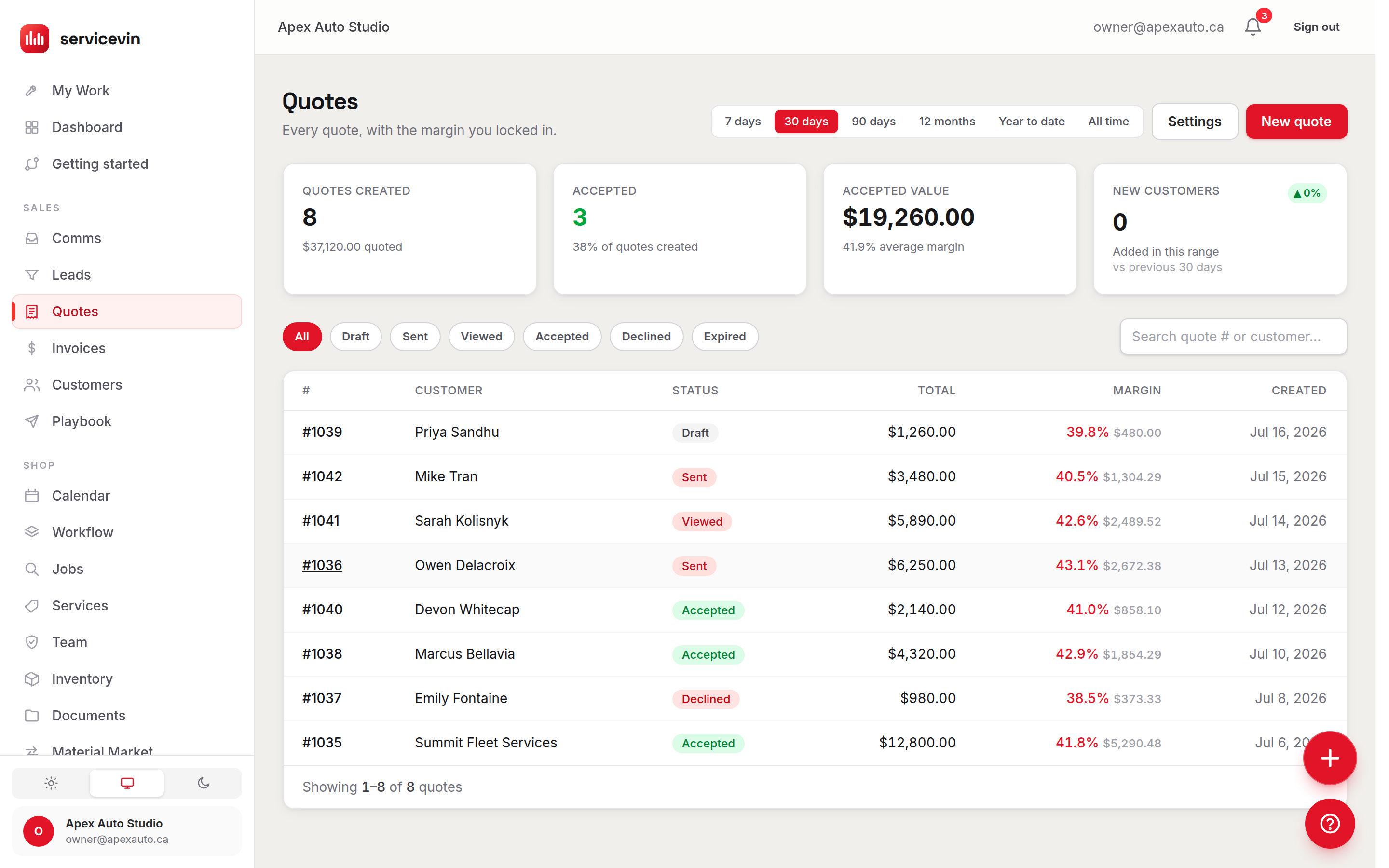
The money is decided on the quote.
So that is where the record starts. Build it line by line and watch the margin move as you type, costed from the film on your shelf. Your customer approves it online and puts a deposit down.
- Live margin in dollars and per cent while you build
- Approved online, with add-ons and a deposit, no phone tag
- Saved templates for the jobs you quote every week
Then the yes books itself, and the job bills itself.
Same customer, same vehicle, same record, on the two screens below.
Step two
app.servicevin.com/calendarA yes puts a car in a bay.
The approved quote becomes a scheduled job with its own work and prices, nothing retyped. Your booking page takes the rest, and double booking is blocked in the database.
app.servicevin.com/calendar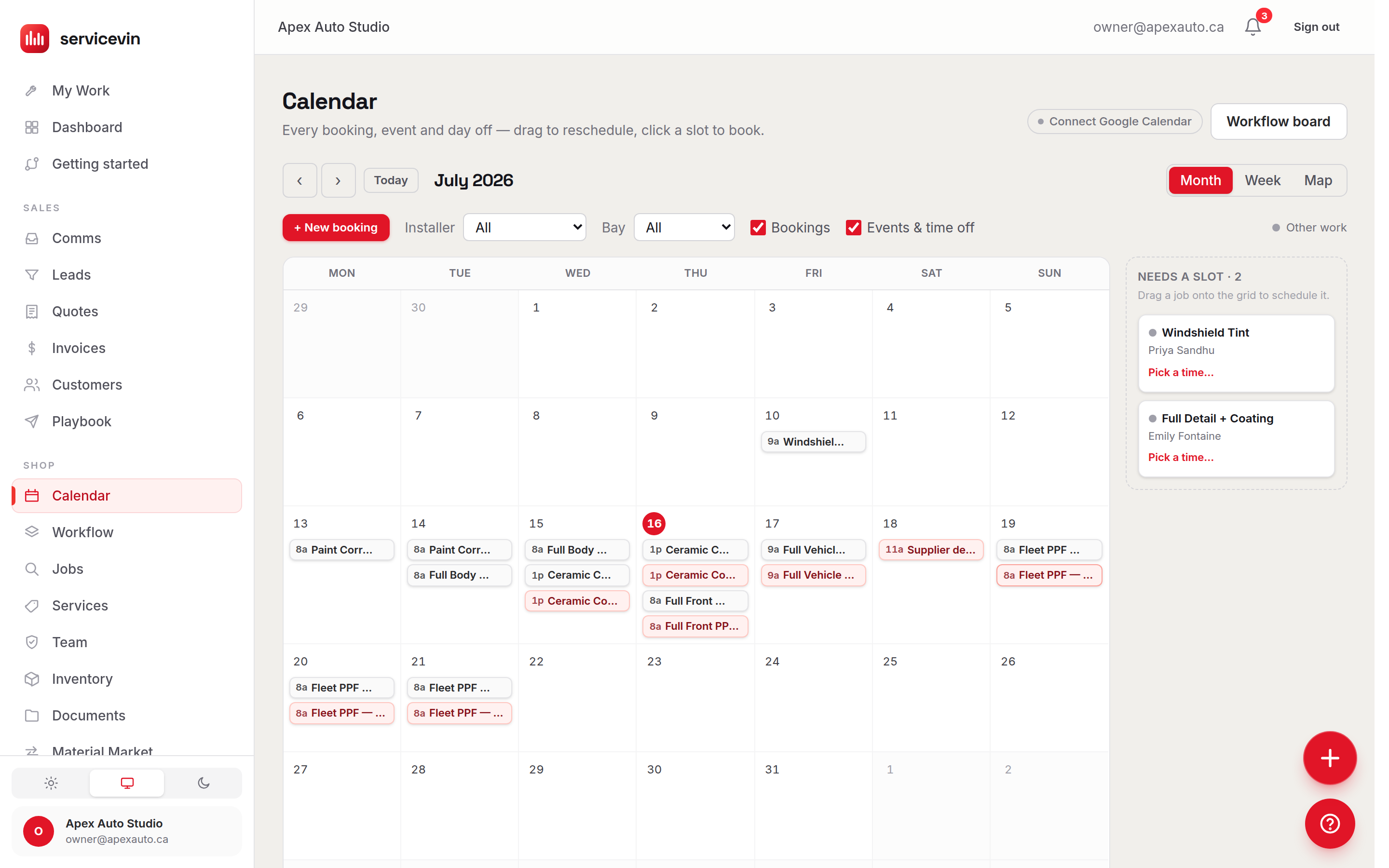
The month board, the bay filters and the unscheduled tray. Step three
app.servicevin.com/invoicesThe invoice is the job. You don't build it twice.
The bill is the job's own priced lines, change orders and all, and the deposit taken at booking is already on it. One bill per job, so nobody pays twice.
app.servicevin.com/invoices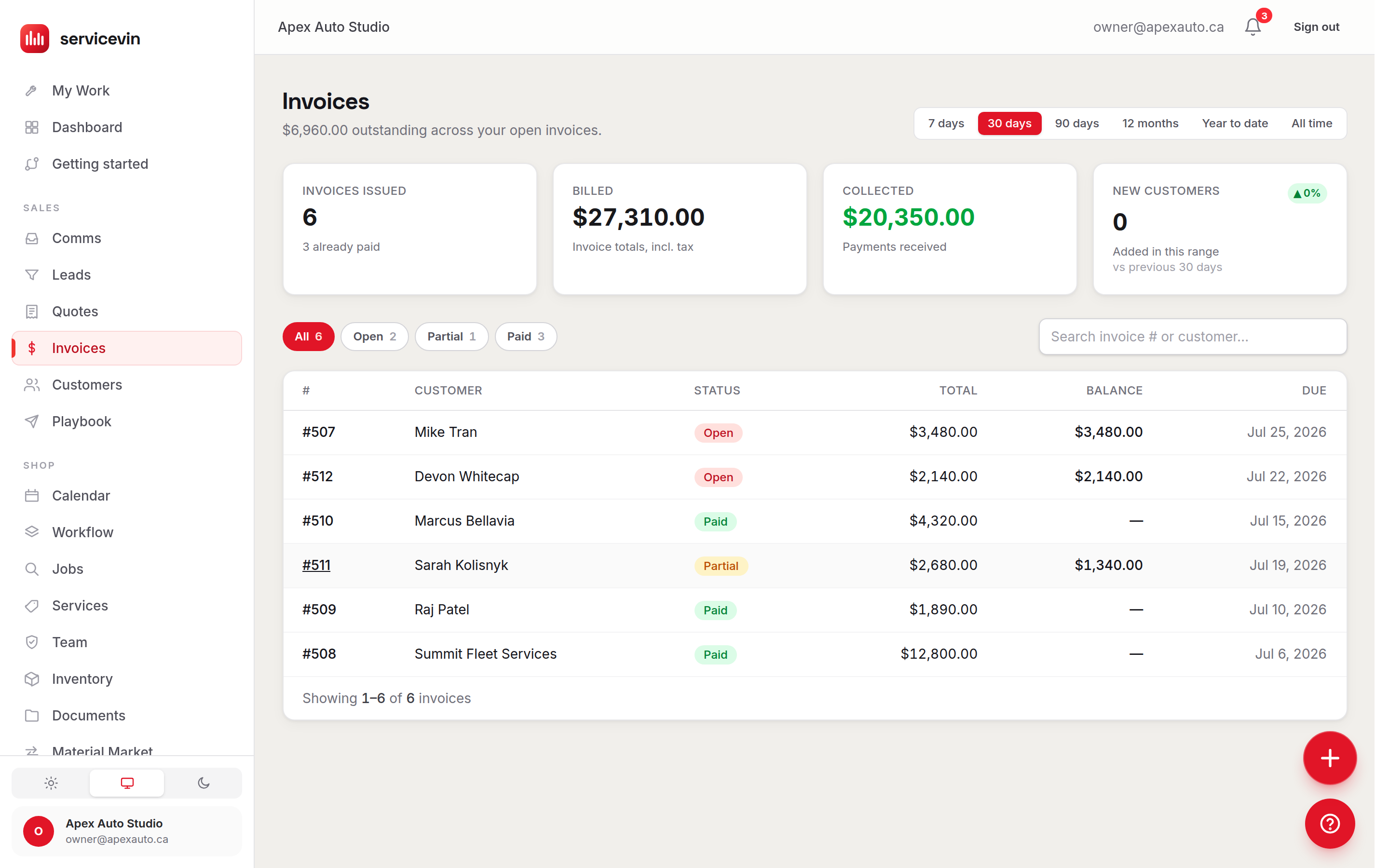
Statuses, totals, balances and what is still owed.
Step fourTheir phone, your invoice
They pay on the record that quoted them.
A card at the desk, a deposit online, a partial now and the balance on pickup. It runs through Stripe on your own connected account, so your shop is the merchant of record.
- Deposits, partials and guards against over-collecting
- A card surcharge, if you charge one, is on the invoice, the receipt and the report
- Automatic follow-ups chasing what is unpaid, from rules you can read and editGrowth and up
A sample invoice on the customer's phone: the quote total, the deposit already received, and the balance to pay by card.
That is the whole loop, and it is one login.
Four steps, one record, nothing retyped. The plan that runs all of it starts at $79/mo.
14-day free trial — no credit card required, cancel anytime
The half nobody expectsThe installer app
Your crew's hours are on that same job.
The job the deposit runs through is the job your installers clock into, so the labour on a car is measured, not guessed at month end.
- They clock in from the bay on their own phone
- A stopwatch per work item, against the time you expected
- Flat-rate and hourly pay adding up live, landing on the job
- A technician never sees what you charge, or customer contact details
A sample installer app screen: a stopwatch per work item running against the expected time, and the day's pay adding up, with no customer pricing shown.
“Moving everything sounds like a nightmare.”
So we took it off you: export a CSV from whatever you run today and our team maps it, dry-runs it and loads it.
What comes across: customers, vehicles, invoice history, quotes, job history and open leads. What doesn’t yet: photos.
Before you start.
The five things shops ask on the way in.
Do I have to move everything over on day one?
No. Most shops start by quoting the next car that walks in and sending that one invoice. Your booking page is live from the moment you sign up. Bring your book across whenever you are ready; our team does the mapping.
Does the free trial need a credit card?
No. 14-day free trial — no credit card required, cancel anytime. You can load your book and test the whole loop before paying anything.
What does it cost?
Four flat plans: Essentials $79, Growth $199, Operations $299 and Command $399. The whole loop on this page runs on the entry plan at $79/mo; the automatic follow-ups need a bigger plan and are marked with it. Team logins are unlimited from Growth up.
Will my installers see what I charge the customer?
No. The installer app never shows customer pricing or contact details. A technician sees the work assigned to them, their own stopwatch against the time you expected, and their own pay adding up.
What actually transfers when you migrate my shop?
Customers, vehicles, invoice history, quotes, job history and open leads. Photos do not come across via import today. We would rather tell you that now than after your file is loaded.
Start with one car.
Quote the next job that walks in, book it, invoice it and take the card, on one record. Bring the rest of your book across when you are ready.
14-day free trial — no credit card required, cancel anytime