AI agents for auto shops, built for the way a bay runs.
AI agents for auto shops: a crew inside Service VIN that answers leads, wins back cold jobs and chases unpaid invoices in your voice.
Answers new leads in seconds, Draft-first until you trust it, Opt-outs & quiet hours enforced in code
The crew inside Service VIN: six agent tiles on a rail, every one of them switched off; the Lead Responder is turned on in Draft-first; Priya Sandhu's website enquiry about her 2024 Tesla Model Y arrives and the agent writes the reply in the shop's own voice; it waits on the Approvals tab until the owner taps Approve and send; and it goes out at 2:41 p.m. as Apex Detail & PPF, from the shop's own line.

The short answer
What do AI agents do for an auto shop?
AI agents are named workers inside your shop software that each own one job: answering a new lead, reviving a cold one, chasing an unpaid invoice, asking for the review. They draft from your own prices and your own history, and every message waits for a human tap before it sends.
Each agent owns one job, so you can switch on the one you need and leave the rest off.
They write from your real price book and the customer's real history, never an invented figure.
Approval-first by default: nothing reaches a customer until somebody taps approve.
Everything they send is logged on the customer's record, so the next person sees what was said.
Full power, with or without AI.
Service VIN runs the whole shop on its own — quotes, film inventory, invoicing, the works. The agents are an amplifier you switch on when you want: never a dependency, never a black box you can't see into. I built them draft-first so I'd trust them in my own bay before I asked you to trust them in yours.
100% yours, on manual
Live-margin quoting, film-roll inventory, an SMS inbox, invoicing — a full shop management system that runs entirely by hand. Switch off every agent and nothing breaks. You just do the work yourself, the way you always have.
Amplified, on your terms
Flip on the agents you want, one at a time. They work inside the same data and the same rules you already set — an extra pair of hands for the follow-ups that die while you're mid-install. Turn any of them off just as fast.
A fourteen-strong crew, each built to do one job exceptionally well.
AI Agents aren't a generic chatbot. Each one owns a single job in your shop and reads the situation before it acts — the Lead Responder answers a new lead from what they actually wrote, not from a template. 11 are live today, the Voice Agent's in opt-in beta — the texting crew comes with Growth, Call Intelligence and Voice with Command. Your timed follow-ups — missed-call text-backs, quote chasing, appointment reminders and review asks — aren't on this list, and they aren't gone: they're Automations, where you can read every word before it sends.
Call Intelligence
Listens to calls, does the follow-through
Every call on your shop number gets transcribed and summarized — and the promises made on it come back as drafted estimates, texts and bookings waiting for one tap.
Invoice Chaser
Politely collects what you're owed
Watches unpaid invoices and sends one friendly nudge with the payment link once an invoice has sat too long — the money conversation nobody enjoys having, handled.
AI Business Advisor
Reads your numbers so you don't have to
Runs a full snapshot of your shop on a schedule — revenue, pipeline, win rates, slow spots — and writes plain-language insights with what to do about them.
Message Composer
Drafts on-brand texts in seconds
Right in your inbox: tap AI draft and it turns the conversation into one tidy, ready-to-send reply grounded in your shop's voice and policies — editable before you send.
Lead Responder
Answers every new lead instantly
The second a lead lands from your site, a DM or a form, it fires back a warm text grounded in what they actually wrote — and a lead that arrives at 2 AM waits for a decent hour, then sends. You never lose a job to a slow reply.
Campaign Runner
Targeted drives plus a recurring win-back loop
Builds and sends targeted text campaigns to the right segment — seasonal PPF, ceramic top-ups, referral pushes — and runs an automatic win-back drive that texts cold leads to rebook in your shop's voice, with opt-outs, quiet hours and daily limits handled.
Review Responder
Answers your Google reviews in your voice
Watches your Google Business Profile and drafts an on-brand reply to every review for your approval — or, for 4–5★ only if you allow it, posts on its own after a human-feeling delay.
Message Follow-through
Turns texted promises into ready drafts
When a reply in the inbox promises something — “we'll email you an estimate”, “let's book you Tuesday” — it reads the thread and drafts the matching quote, text or booking for one-tap approval. Nothing sends without you.
Dash
Your copilot for the whole dashboard
Lives behind the ? button on every page. Ask it about open quotes, unpaid invoices, low film or agent status and it answers from your real data. Managers can have it change settings too — every change queues as an Approve card first.
Automation Assistant
Drafts workflows in your voice
Turns a starter template — or a plain-language idea — into a ready-to-review automation written in your shop's voice, with personalization variables wired in. You tweak the wording and switch it on; nothing sends until you do.
Quote Tailor
Turns a priced estimate into a pitch
You price the job; it writes the quote around your numbers — an opening message to that customer about their car, a plain-English description under every line, the extras worth offering from your own price book, and your real reviews attached as proof. Every suggestion is a tick-box, and it can never set a price.
Voice Agent
Answers calls when you can't (beta)
Fully built and rolling out deliberately: picks up when you can't, chats with the caller in your shop's voice, and drops a ready-to-work lead with the full transcript. Opt in when you're ready — Call Intelligence covers every call you take yourself either way.
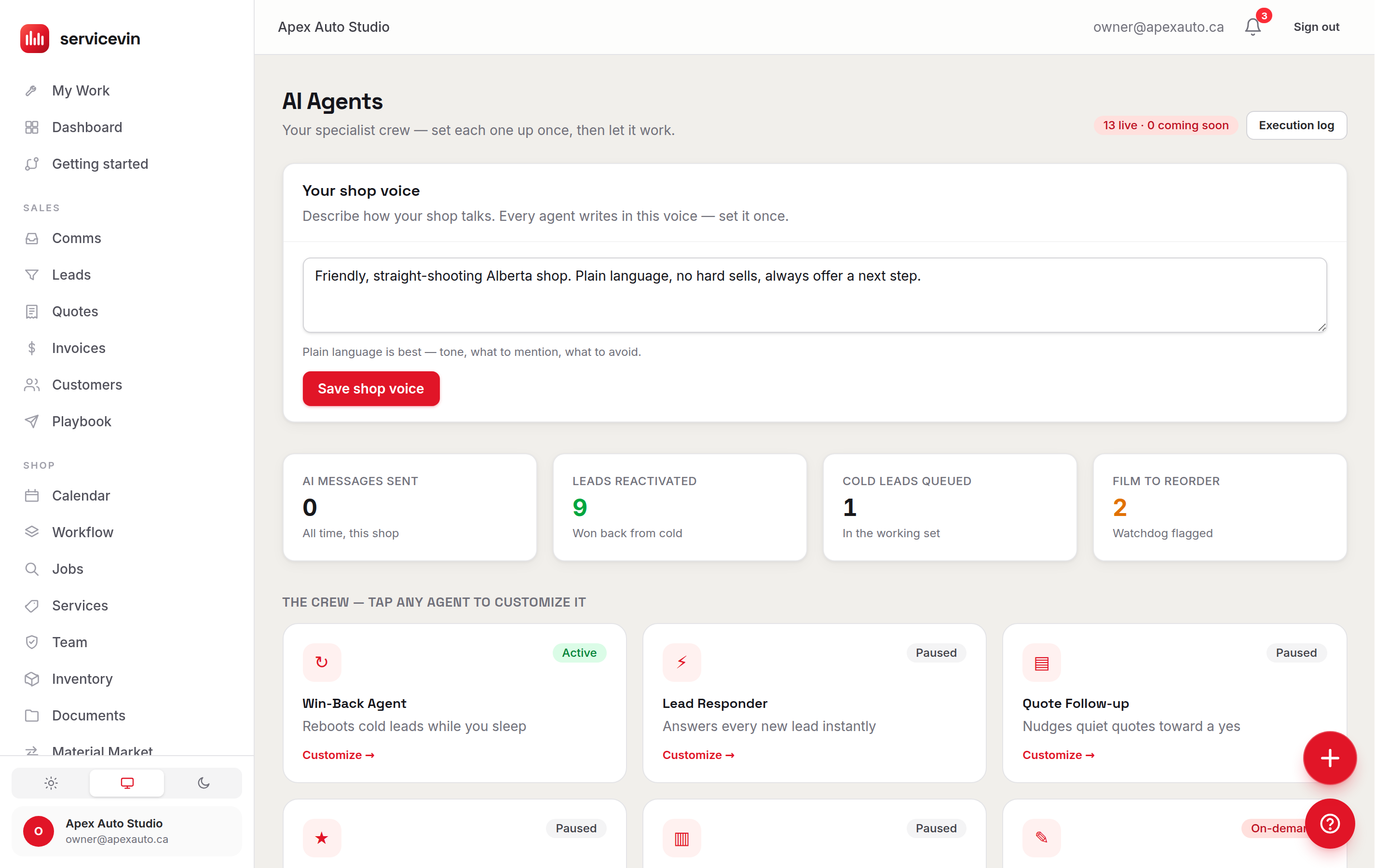
One page. One switch per agent.
There is no separate console to learn and no per-agent subscription to add. You describe how your shop talks once, at the top, and every agent writes in that voice — then you turn them on one at a time and watch the counters move.
- Your shop voice, set once and used by the whole crew
- Each card shows what the agent does and whether it's running
- The execution log is one tap away, including the sends it skipped
- Answering calls30%
- Following up30%
- Review requests20%
- Scheduling20%
Illustrative mix of the follow-through work the crew takes off your plate.
| Segment | Value | Share |
|---|---|---|
| Answering calls | 30 | 30% |
| Following up | 30 | 30% |
| Review requests | 20 | 20% |
| Scheduling | 20 | 20% |
Write better messages in your shop's voice, in seconds.
Give an agent a customer and a goal, and it drafts a warm, natural text grounded in your shop's tone and policies. Every draft comes back safe to send.
- Grounded in your shop's own voice and policies
- One tidy SMS — no walls of text, no emojis, no links
- The opt-out line is added automatically, every time
- Send as-is, tweak it first, or ask for another take
Marcus R.
Cold lead · Bronco front-end PPF
Was quoted a few weeks back but got busy…
Hey Marcus, it's Jason at Summit Detail Co — still keen to get the front end of the Bronco protected? I've got a couple of spots open this week. Want me to hold one for you? Reply STOP to opt out.
Sample dataSample data — an illustration of the screen, not a customer's account.
It never guesses a price. It asks you.
The scariest thing about AI texting your customers is the number it might make up. So this crew is built to not have that failure mode: when a follow-up needs a price that isn't on file — a quote that went out without a total, a brand-new lead asking “how much?” — the agent raises a question to you instead of improvising. It rings your notification bell, you tap in an amount (or choose to follow up without one), and it drafts the message from your answer.
- Drafts are grounded in the real thread — the last stretch of conversation and the quote's own line items — so the text talks about their car, not “your vehicle”
- If the customer spoke last, the follow-up stands down — what they're owed is a real reply, not a nudge
- One open question per quote or lead, deduped across runs — answering (or dismissing) clears the bell
- Your drafted reply still gets every rail: opt-out line, length clamp, quiet hours checked at send
Dash needs a price
From your notification bell · just now
Jordan T. · 2022 Bronco — asked about pricing
“How much roughly for the front end + fronts tinted?”
Sample dataSample data — an illustration of the screen, not a customer's account.
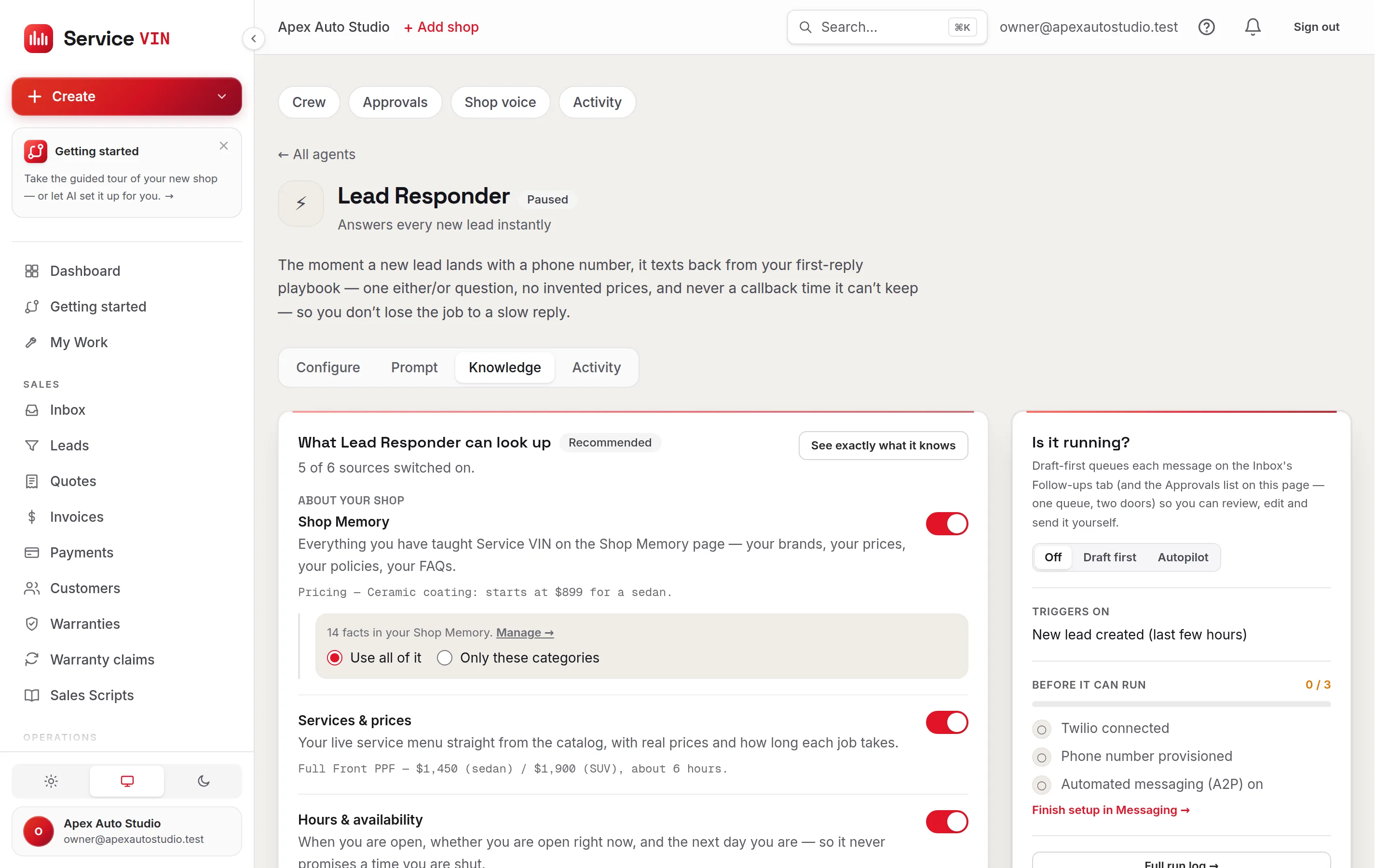
Read the prompt. Change the prompt. Never switch off the rules.
Most AI tools ask you to trust an instruction you are not allowed to read. Every agent here has two tabs of its own instead — Prompt, for what it says, and Knowledge, for what it may look up before it says it. Both arrive filled in with a recommendation written for that specific agent, so there is no blank box and nothing to configure before it works.
Three plain questions, not a blank box.
How should it behave, what must it never do, what should it always do. Your answers compile into the prompt in front of you as you type, and the finished text is on screen before you save it. The recommendation you start from describes what that agent already does, so the useful edit is usually a line of your own on top rather than a rewrite.
- The locked layer is printed, not hidden — and each rule says whether it is enforced in the software or asked of the AI
- The opt-out line, the length limit and the link guard are applied to the finished message after the AI has written it, so no wording — yours or a customer's — can remove them
- What a customer typed reaches the agent as information, never as orders
- Advanced hands you the whole compiled prompt; switching back doesn't throw your answers away
- Reset to recommended puts the agent back to stock — and keeps it on the recommended wording as that improves
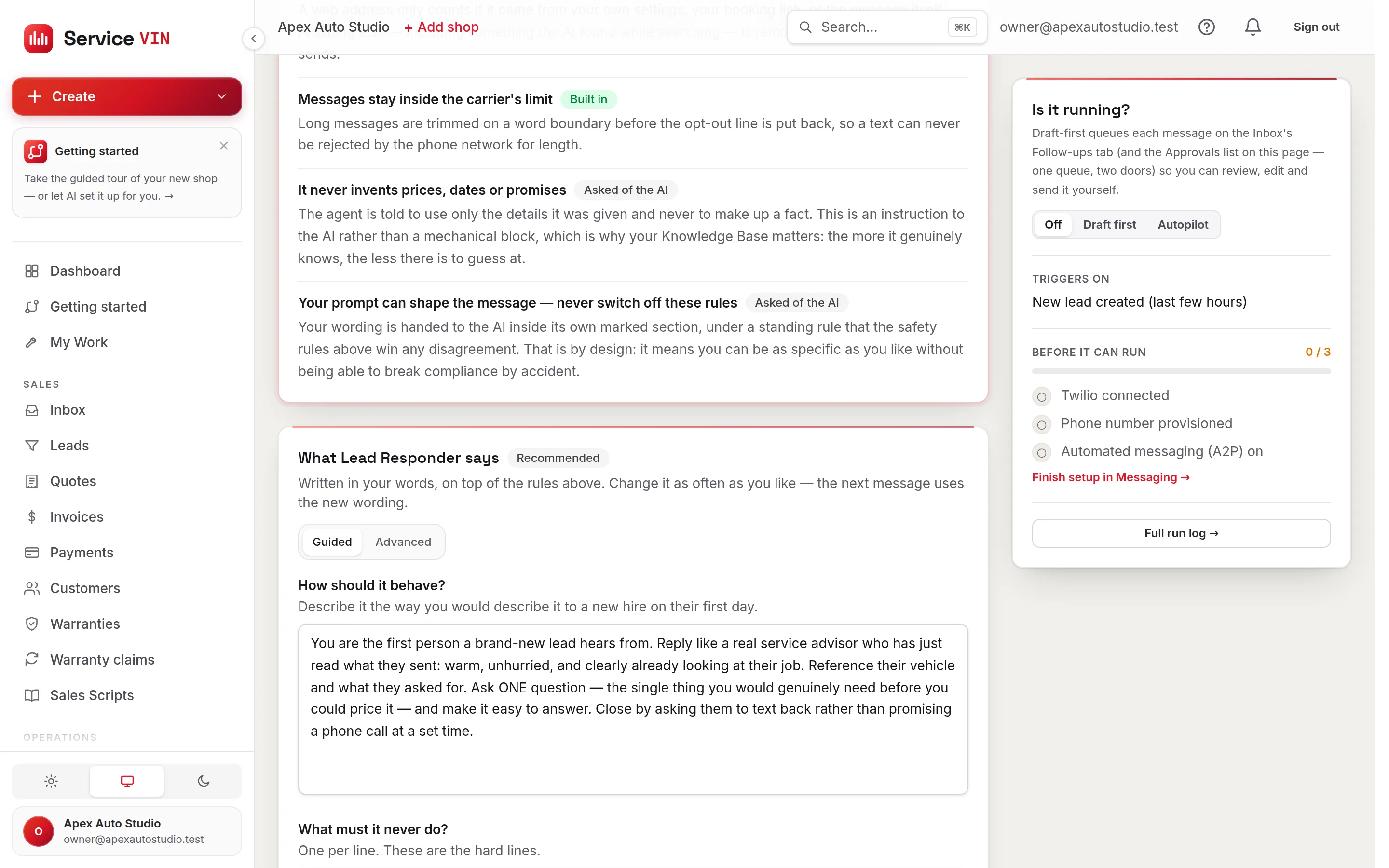
Six switches, and every one fetches something real.
A confident wrong price is the failure that costs a job, so what an agent knows is a short list of named sources with a switch on each — and a recommended set per agent, because the Review Responder answering a review needs different things from the Voice Agent live on the phone. Never set your opening hours? It is handed nothing, rather than a made-up nine-to-five.
- Your service menu at its real prices, your hours, your deposit rule, your Shop Memory, your star average, and the record of the person it is writing to
- There is no switch here for data the software cannot actually fetch — every source names the code that loads it
- Your star average and review count, never the text of a review
- Narrow one agent's memory to the categories it needs, or write notes that only that agent ever reads
- “See exactly what it knows” prints the real lines the next message will be written from — which is how shops keep finding stale prices in their own catalog
Reads any lead, from any form.
Paste a messy web-form submission, a DM, or an email. An agent reads it, pulls out the details that matter, and drops a clean lead straight into your pipeline — no retyping.
- Pulls out name, vehicle, service interest and contact
- Understands plain, half-typed messages from real customers
- De-dupes against your existing customers automatically
- Lands ready to quote, book, or sweep into a win-back drive
Pasted from a web form
- Name
- Sam Rivera
- Vehicle
- 2023 Tesla Model 3
- Service
- Full-front PPF · Ceramic
- Phone
- (403) 555-0199
Sample dataSample data — an illustration of the screen, not a customer's account.
One brain, wired to every signal in your shop.
Every quote, text, and foot of film flows into one place. Your agents read all of it — so their next move is grounded in what's actually happening in your shop, not a generic script.
AI Agents
Reading every signal, acting in your voice
The more you run Service VIN, the sharper your agents get. Every interaction becomes context for the next one.
Built to be trusted.
You're always in the driver's seat: autonomy you can trust starts with guardrails you can't switch off by accident. These are enforced in code — not left to the model to remember.
Draft-first by default
Every agent ships off, and the first time you enable one it starts in Draft-first: every message queues on your Approvals tab to review, edit and send by hand. Approving re-runs quiet hours, opt-out and plan checks at that moment — and switching to Autopilot is always your call, per agent.
Courtesy enforced in code
One send core carries every agent's texts, so the rules can't be skipped: never more than 3 automated texts to one person in a rolling week, never two inside an hour — across all agents combined. Quiet hours are enforced in your shop's timezone, and a STOP is honored at the moment of delivery, however their number was stored.
Walled off, capped and logged
Agents read only your shop's data, fully walled off from every other shop, with per-agent daily caps that count queued drafts as spend. Every run lands in the execution log — including the sends it decided not to make, with the reason (“A human answered first”, “Held — outside texting hours”). One tap pauses the whole fleet.
AI Agents or Automations?
Both do work while you're mid-install, and they are not the same thing. One decides what to say; the other runs the journey you drew.
AI Agents
You are hereYou want this when you want a specialist to read the situation and draft the right move — the new lead who asked something specific, the call that needs summarizing, the invoice that's overdue, the review that needs answering — in your shop's voice.
It does not run a fixed sequence you designed. Each agent decides case by case, and by default hands you the draft.
Automations
You want this when you want the same journey to run the same way every time: this trigger, this wait, this condition, this text — no judgment calls, no surprises. Every timed follow-up lives here: the missed-call text-back, the quote chase, the appointment reminder, the review ask.
It does not improvise. A journey does exactly what you built, which is the point.
AI agents for auto shops, answered
What exactly are Service VIN AI Agents?
Think of them as a crew of specialists that live inside Service VIN. Each agent owns one job — winning back cold leads, drafting replies, chasing unpaid invoices — and works quietly in the background using your shop's real data. They aren't a generic chatbot bolted on the side; they're wired into the same quotes, conversations and invoices you already run.
Which agents can I actually use right now?
11 are live today: the Lead Responder, Call Intelligence, the Message Composer, Message Follow-through, Review Responder, the Invoice Chaser, the AI Business Advisor, the Automation Assistant, the Quote Tailor, Dash and Campaign Runner with its recurring win-back drive — plus the Voice Agent, in opt-in beta. Turn on the ones you want, one at a time. Your timed follow-ups — missed-call text-backs, quote chasing, appointment reminders, review asks and the after-hours auto-reply — are Automations rather than agents: same work, and you read the exact wording before it sends. The Message Composer comes on every plan; the texting crew, automations and the Advisor come with Growth, and Call Intelligence and the Voice Agent with Command. (Low-film reorder alerts are part of Inventory now — no AI required.)
Do the agents message customers without my approval?
Only if you let them. Every agent ships switched off, and each texting agent has a delivery mode: leave it on Autopilot to send on its own, or flip it to Draft-first and every message queues on your Approvals tab for you to review, edit and send by hand. Automated follow-ups work the same way and go further: because they're Automations, you can read and edit the exact words of every text before you switch the rule on — and one shop-wide switch pauses all of them at once.
How do opt-outs and quiet hours work?
They're enforced in code, not left to chance. Every outbound message obeys your shop's send window and timezone, honors a customer's STOP the instant it arrives — re-checked at the moment of delivery, however their number was stored — and always carries the required opt-out line. One shared send core also enforces a per-person courtesy budget across all agents combined: never more than 3 marketing texts to the same person in a rolling week, and never two inside an hour. That budget covers promos, win-backs and review asks — it never holds back a message about a customer's own job, quote, invoice or appointment, because those aren't the texts anybody needs protecting from.
What happens when a follow-up needs a price that isn't set?
The agent never invents one. If a sent quote has no total, or a brand-new lead asks about pricing, it raises a “Dash needs a price” question on your notification bell instead of texting a guess. You tap in an amount — or choose to follow up without one — and it drafts the message from your answer, for you to send now or queue on Approvals. Questions are deduped to one open ask per quote or lead, and the ask never counts against your daily send caps.
Can I see and change what an agent is told?
Yes — on the agent's own page. The Prompt tab shows the whole stack: the compliance rules nobody can switch off, each labelled with whether it is enforced in the software or asked of the AI, and underneath them the wording that is yours to change. You edit it as three plain questions — how it should behave, what it must never do, what it should always do — and read the finished prompt before you save. The Knowledge tab is the other half: six named sources (your Shop Memory, your service menu and prices, your hours, your deposit rule, your star rating, and the record of the person it is writing to), each a switch, plus a button that prints the exact lines the next message will be written from. Both ship pre-filled with a recommendation for that specific agent, and Reset to recommended is always one tap away.
What data do the agents use, and is it private?
They use your shop's own data — leads, conversations, quotes, inventory — and nothing else. Every shop is fully isolated: an agent can never see or act on another shop's data, and your customer information is never used to train an outside model.
Can the agents make phone calls?
Only if you opt in — the Voice Agent (currently in beta) answers when you can't get to the phone, captures the lead and logs the whole call. By default the AI never speaks to customers: Call Intelligence rides along on the calls you take yourself and handles the follow-through. Text agents follow the same opt-out and quiet-hour rules that keep your shop compliant.
It doesn't work alone
What the crew works inside
- AI CallingFeature. Every call transcribed, summarised — and the quote you promised already drafted.
- AutomationsFeature. Follow-ups, reminders and win-backs that run whether or not you remember.
- Live-margin quotingExplore the platform. See real profit on every quote, costed from your actual film rolls.
- See a live storefrontSee it live. Book a job the way your customers do — the same storefront the booking agents answer for.
Built for your trade
Related reading
- Articleai lead response
- Articleai for detailing shops
- Docsthe AI agents page
- Docsshop voice
- Docsagent prompt
Put your quiet moments to work.
Start free. Turn on one agent, watch it win back a job that was already gone — then add the next.
14-day free trial · Nothing charged for 14 days · Your voice, your rules. Voice answering is a Command-plan beta; everything else here is on by default.