Online booking for auto shops, open when the bay doors are shut.
Online booking for auto shops: a branded storefront where a customer picks a service, pays a deposit and takes a slot that is really free.
Nothing charged for 14 days, Live in an afternoon, Works with your existing site
Her phone at 11pm: a shop storefront with the package chosen, a day grid with the drop-off picked, the deposit paid at checkout, and the same booking on the job board at the shop.

The short answer
How does online booking work for an auto shop?
Your services are published with their real prices and durations, and the storefront offers only the slots your bays and installers can honestly take. The customer picks the work, adds any extras, pays a deposit if you ask for one, and the job lands on the board with the vehicle attached.
- The availability shown is the calendar's own, so a booking cannot land on a full bay.
- Deposits are taken at the moment of booking, into your own Stripe account.
- Add-ons and upsells are offered during the booking rather than chased afterwards.
- The booking arrives as a job with the customer and the vehicle already on it.
From late-night browser to booked job, in three moves.
Three taps on a phone at 10pm, and then the part nobody sells you on: the finished booking is already sitting on the board you work from in the morning.
Job board, added automatically
NewFull-Front PPF, Tesla Model 3
Bay 2, 9:00 AM, $150 deposit paid
Nobody at the shop touched any of that. The service, the slot and the deposit were the customer's three taps; the customer record, the job on the board and the drafted quote were Service VIN's.
Sample dataSample data — an illustration of the storefront and the board, not a customer's account. Prices and openings are your shop's.
The parts a booking form doesn't have.
The after-hours shopper decides on their phone, on the couch — not on a call to your shop. Meet them with a storefront that closes the sale while you sleep.
Productized services
Package your PPF, wrap, ceramic and detail work into fixed, buyable services — priced by vehicle size or tier so there’s no guesswork.
Pick your installer
Optional: let a repeat customer request the tech who did their last car. Times narrow to that person’s real shift, and the job lands on the board already assigned to them.
Add-ons & upsells
Offer ceramic on top of a wrap, or windshield film with a PPF package, right at checkout — the easiest place there is to grow a ticket.
Conversion insight
See views, booking starts and booked revenue per service, so you know exactly what’s selling and what to promote.
Your booking page will never look like the shop down the street.
six completely different customer-facing designs — not six colour schemes. One choice per area — booking page, quotes & documents, customer portal, lead forms, emails and pdfs — or one click to put the same design on all six. Free on every plan, on the 14-day trial included.
Modern
Today's design — clean, bright and friendly. The safe default.
Concours
Editorial luxury — dark, spacious and magazine-like, for premium studios.
Apex
Motorsport industrial — condensed caps, hard angles and racing stripes.
Heritage
Paper and ink — a real work order on a clipboard, stamped and torn off.
Showroom
Glass and light — a configurator, with the build sheet filling in as they choose.
Obsidian
Black and gold — a pinned order dossier beside one lit stage, for high-ticket work.
Collect a deposit and lock in the slot.
A booking without money down is just a maybe. Service VIN takes a configurable deposit through Stripe the moment a customer books, so the ones who show up have already committed.
- Set a flat or percentage deposit per service
- PCI-secure Stripe checkout — you’re never handling cards
- The slot is held the instant the deposit clears
- Balance and paid-to-date tracked straight through to the invoice
Your booking
Full-Front PPF, Track Package
Tesla Model 3, Fri Jul 11, 9:00 AM
Secure deposit
Powered by Stripe, PCI-secure
Sample dataSample data — an illustration of the screen, not a customer's account.
Add online booking to the site you already have.
No rebuild, no migration, no “please move to our platform.” Service VIN is one booking engine with four ways to launch it — pick whatever fits how customers already find you.
Embed on your website
One snippet. Any platform.
Paste a single line of code and the booking storefront appears right on your page — inline or as a popup. It picks up your Service VIN logo and brand color, so it looks like your shop rather than ours.
<!-- Paste once, anywhere on your site --><script src="https://app.servicevin.com/embed.js" async></script><div data-servicevin-shop="your-shop"></div>Tested on
Hosted booking page
No website? Get a fast, SEO-ready page at yourshop.book.servicevin.com or your own custom domain. See a live storefront →
“Book now” link & button
Drop a booking link in your Instagram bio, the Google Business “Book” button, Facebook, or your email signature.
API & webhooks
For custom builds and agencies: a REST API and webhooks push every booking into whatever you already run.
One source of truth. Live availability, deposits, pricing and branding stay identical everywhere a customer can book — change a service once and it updates on every surface at the same time.
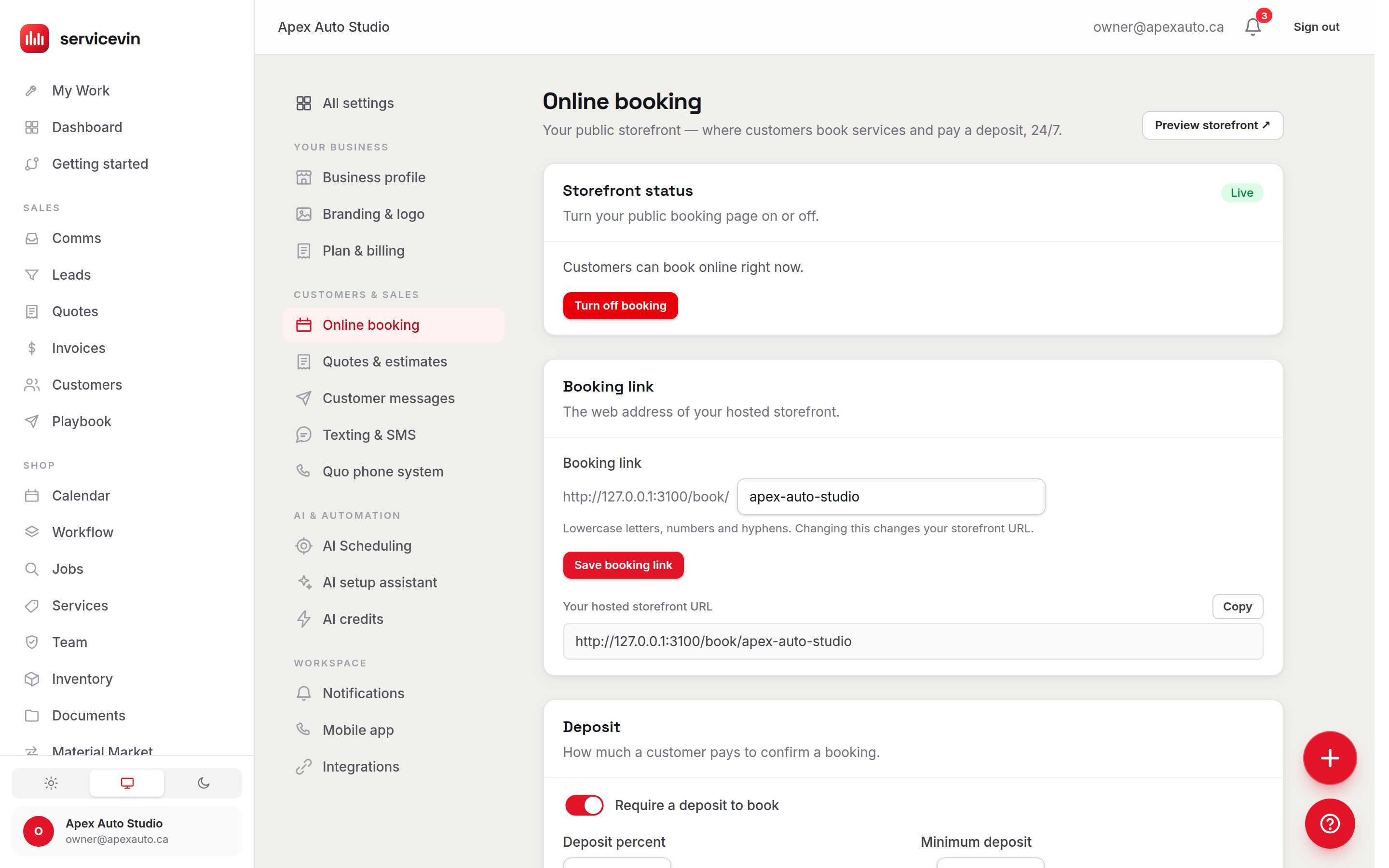
Everything the storefront sells is a row in one settings screen.
Services, durations, tiers and the deposit rule live in one place. Change a price or block a day here and every surface a customer can book on updates at the same time.
Storefront, calendar, or AI Scheduling?
Three pages on this site touch your booking calendar and they are genuinely different things. Here is the plain split.
Online Bookings
You are hereYou want this when you want the customer to book themselves — pick a service, pick a slot, pay the deposit — without anyone at your shop answering.
It does not give your team a board to work from; it fills the board rather than showing it.
Calendar & Booking
You want this when you want the board your shop works from: every bay, every installer, every job for the day in one view you can drag things around on.
It does not sell to your customer. It is the inside view, not the storefront.
AI Scheduling
You want this when you want help deciding WHICH opening to offer — ranking the slots that fit the job, the bay and the day best.
It does not replace either one. It ranks the openings the calendar already has, for the storefront to offer.
Online booking for auto shops, answered
Still unsure? Book a demo and we’ll set your first storefront up with you.
What exactly is Service VIN online booking?
It’s a branded online storefront for your shop. Customers browse your PPF, wrap, ceramic and detail services, pick a real open slot, pay a deposit, and get a confirmation — without anyone answering the phone. Every booking becomes a customer, a job and a quote inside Service VIN automatically.
Can I add it to my existing website?
Yes — that’s the whole point. Paste one line of code and the storefront appears on your current site. It’s been tested on WordPress, Squarespace, Wix, Shopify, Webflow, Framer and hand-coded HTML. You can also link to it, drop a QR code, or use our API — four ways in total.
Do I need a website at all?
No. If you don’t have a site, use your free hosted booking page at your-shop.book.servicevin.com (or point your own domain at it) and share the link from Instagram, Google Business and your receipts.
Can customers pay a deposit online?
Yes. Set a flat or percentage deposit per service and Service VIN collects it through secure Stripe checkout the moment someone books. The slot is held once the deposit clears, and the balance carries through to the final invoice.
What happens after someone books?
Instantly: the customer record is created, the job drops onto your calendar, a live-margin quote is drafted from your real roll cost, and a confirmation text goes out in your shop’s voice — with opt-outs and quiet hours respected automatically.
Will it double-book my bays?
No. Availability is driven by your real bay capacity and existing jobs, so a slot can only be booked once. Change your hours or block a day and the storefront updates everywhere at once.
Can customers ask for a specific installer?
If you want them to. Switch on “let customers choose their installer” and the storefront adds an optional step listing the techs who can run that service — “anyone available” stays the default. Pick a person and the times narrow to their real shift and open jobs, so you’ll see fewer slots than “anyone”; the booking then lands on your board already assigned to them. It’s off until you turn it on.
It doesn't work alone
What the booking turns into
- Live-margin quotingFeature. Build a quote line by line and watch profit update in real time, costed from your actual film-roll inventory — never underprice a wrap again.
- Win-back AIFeature. A scheduled assistant texts your cold leads to rebook, drafted in your shop’s voice — dead leads turn into booked jobs while you sleep.
- Payments & DepositsFeature. Where the deposit goes, and why it never passes through us.
- Customer PortalFeature. The page the customer gets after they book, under your brand.
Built for your trade
Related reading
The 10pm shopper doesn't call back. Let them book.
A branded storefront that takes the service, the slot and the deposit while the bay doors are shut, and drops the finished booking on your board before you're back in the morning.
Online bookings is on every plan. The win-back texting agents start at Growth, which is also where team logins go unlimited. Nothing charged for 14 days, cancel anytime.